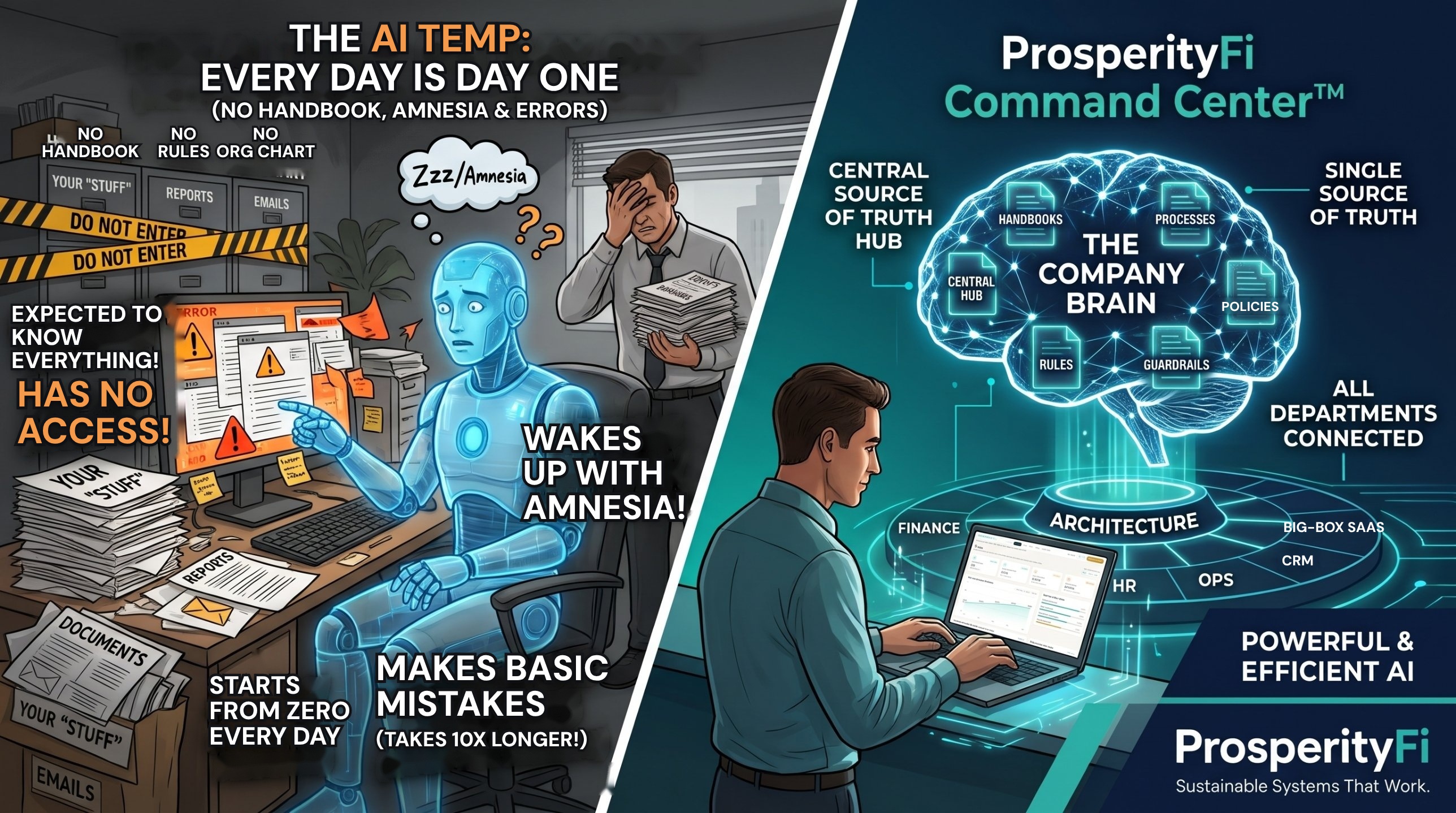
When Microsoft went down on Thursday, November 12, businesses stopped. Outlook and Teams were gone for more than a day, and everyone said so.
Copilot went down in the same outage, and hardly ANYONE said a word online or in the news.
What Happened
Microsoft first flagged technical issues just before 1 p.m. ET on Thursday, November 12, 2026. The disruption lasted more than 24 hours and reached more than 70 countries and territories.
Outlook and Teams went down, and users also reported that Copilot was down. Microsoft said it was a technical issue, not malicious or cyber activity (CBS News). Microsoft's own admin notice listed Exchange Online, Teams, SharePoint Online and Microsoft 365 Copilot among the services customers could not reach (BleepingComputer).
What It Proved
It proved that businesses cannot function without Outlook or Teams. It also showed how little most people care about Copilot to their daily routines.
That is not a knock on the people using it. It is a sign of what Copilot can actually do and CAN'T do inside a company today.
Think of Copilot As A Temp Employee
Think of Copilot like hiring a temp employee, sitting them at your desk and never giving them an employee handbook, company rules and regulations, an org chart, or access to how anything runs across the entire company.
They just have access to your stuff: documents, reports, emails and so on.
Yet, they are expected to know exactly what you do and how you do it, and to figure out what you do not and fill in all the gaps.
Every time they get up from their desk and close their laptop, they come back with amnesia. That is the worst part.
Even if you do explain all your company rules, and the ones for you (processes, style and so on), they still make tons of basic mistakes. You have to redo, fix or adjust the work, and it takes 10X longer than just doing it yourself.
Here's the difference. AI inside one piece of software only sees what that software holds. Connect everything you run on into one central hub with your processes, rules and guardrails, then layer AI on top, and it can analyze the whole company and surface opportunities.
| AI inside one piece of software | Your whole company connected (the Company Brain) | |
|---|---|---|
| Handbook | None | Handbooks live in one hub |
| Rules | None | Processes, rules and guardrails written down |
| Org chart | None | What each department actually owns |
| Access | Your documents, reports and emails only | All departments connected, each person sees only what they should |
| Memory | Amnesia, starts over every day | Context stays in the system |
| Results | Basic mistakes to redo, 10X longer | AI that understands how it all connects |
What A Leak Is
A leak is when time, revenue or margins are leaking out of your business. Most owners never see it, because it does not show up as a line item.
Where The Biggest Leaks Come From
- The process lives in someone's head, so nothing is written down and things stall when they are out.
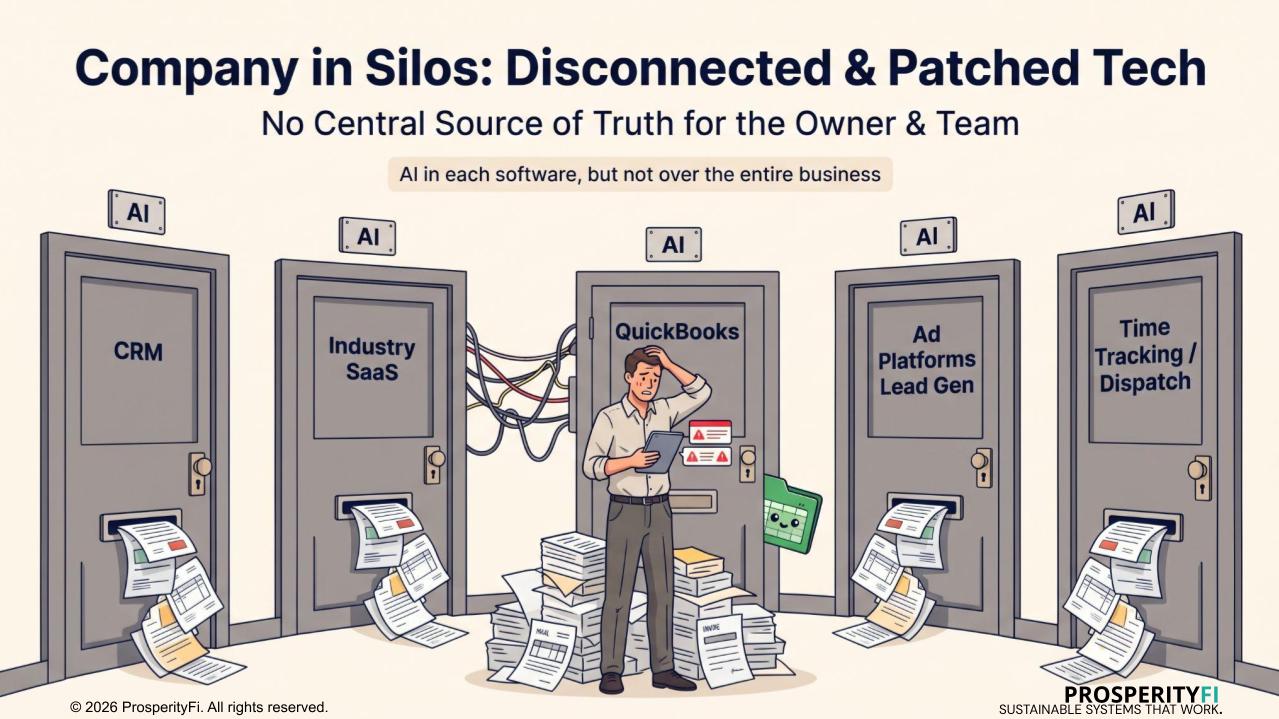
- Disconnected software, platforms and tools. Each does its job and none shares data.
- No single source of truth, so the same number reads differently depending on where you look.
- No central hub tying it all together, so people become the glue.
What That Leads To
- Logging in and out of software all day to answer one question
- Back and forth between people and systems, chasing updates
- Double entry, the same thing typed into three places
- Rework, fixing and redoing what was done wrong
- Paperwork by hand
- Unbilled work and unbilled change orders
- Late billing and late collections
- Slow quotes, no quote follow-up, and quoting mistakes
- Missed calls and messages
- Forgotten customers, lapsed renewals and empty slots
- Money-losing jobs and discounts with no rules
- Overtime and drive time
- Software bloat, paying for software nobody uses
- Blind numbers, so decisions get made late
- Slow training and turnover, because the process lives in people's heads
- An owner stuck in the weeds, and a frustrated owner and team
Now add AI inside each piece of software. Each one only sees its own data, so the AI in your billing software cannot see the change order sitting in your field software. You end up with several AIs, each with a partial picture. Leaks live in the handoffs between your software, and AI inside one piece of software cannot see a handoff.
Why AI Inside A Big-Box Platform Is Not The Answer
This is why AI inside a big-box platform is not the answer.
A company needs a single source of truth. No silos across departments. No AI inside every piece of software, each one working by itself.
It needs one central hub that holds the handbooks, the processes, the rules, the guardrails and what each department owns. That hub is the Company Brain.
What Changes When The Brain Comes First
This is when you layer AI on top of all of that architecture, to help each department and each individual with only what they are supposed to see and do.
Now the AI understands how it all connects and how it impacts the whole company. That is when it becomes extremely powerful and efficient.
This is why AI inside a platform at companies fails.
Where ProsperityFi Command Center™ Fits
This is why we build owners a ProsperityFi Command Center™.
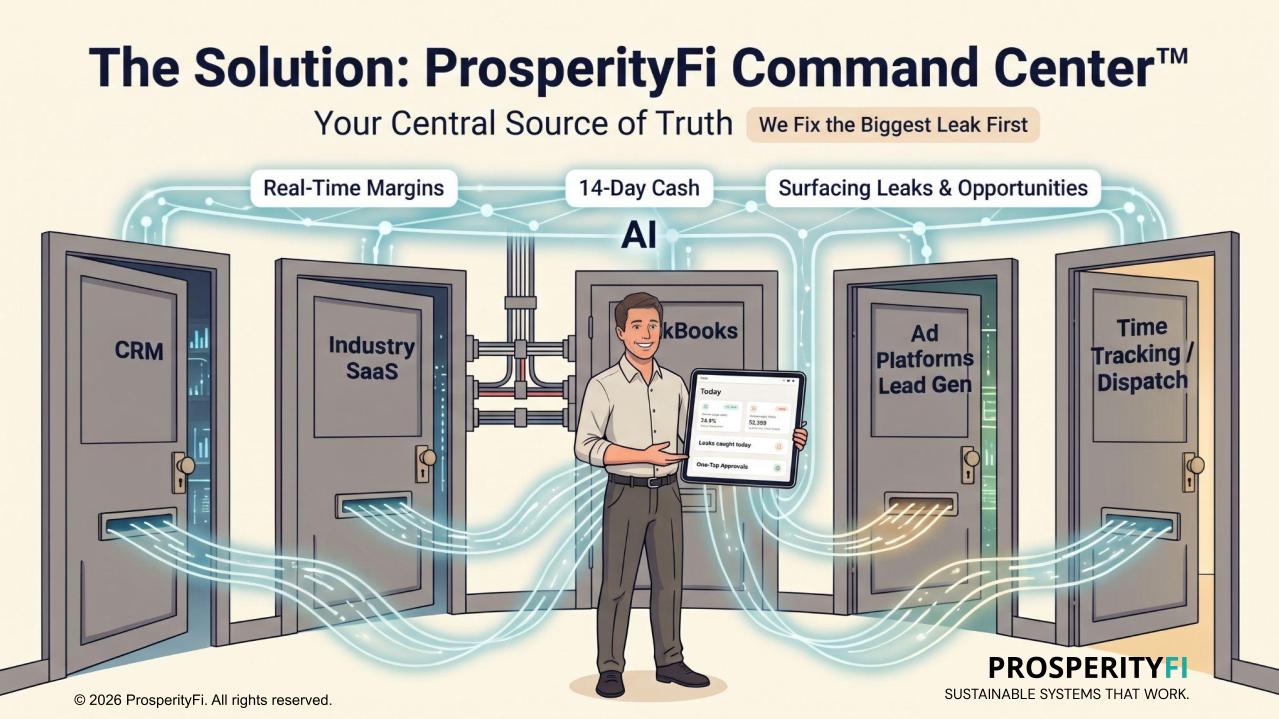
It is one complete, working system built around how your business already runs.
It pulls the software and data you already use into one central source of truth, so nothing sits in a silo, and it runs the whole loop from the first lead to the sale, the work, the payment and bringing the client back.
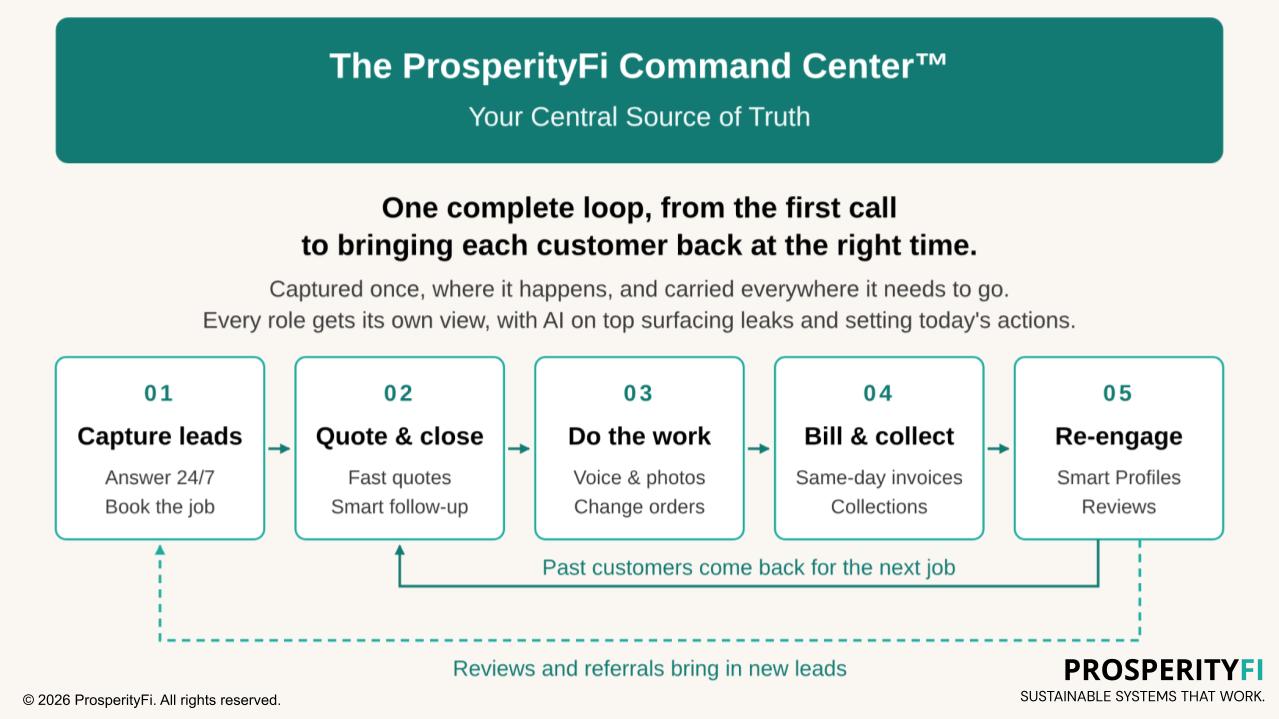
Your handbooks, processes, rules and guardrails live inside it, and AI is layered on top so each person only sees and does what they should.
You get a real-time view of your entire business, with the intelligence to take action already identified for you and your team. You stay in control: review and edit, or approve with one tap, before anything goes out.
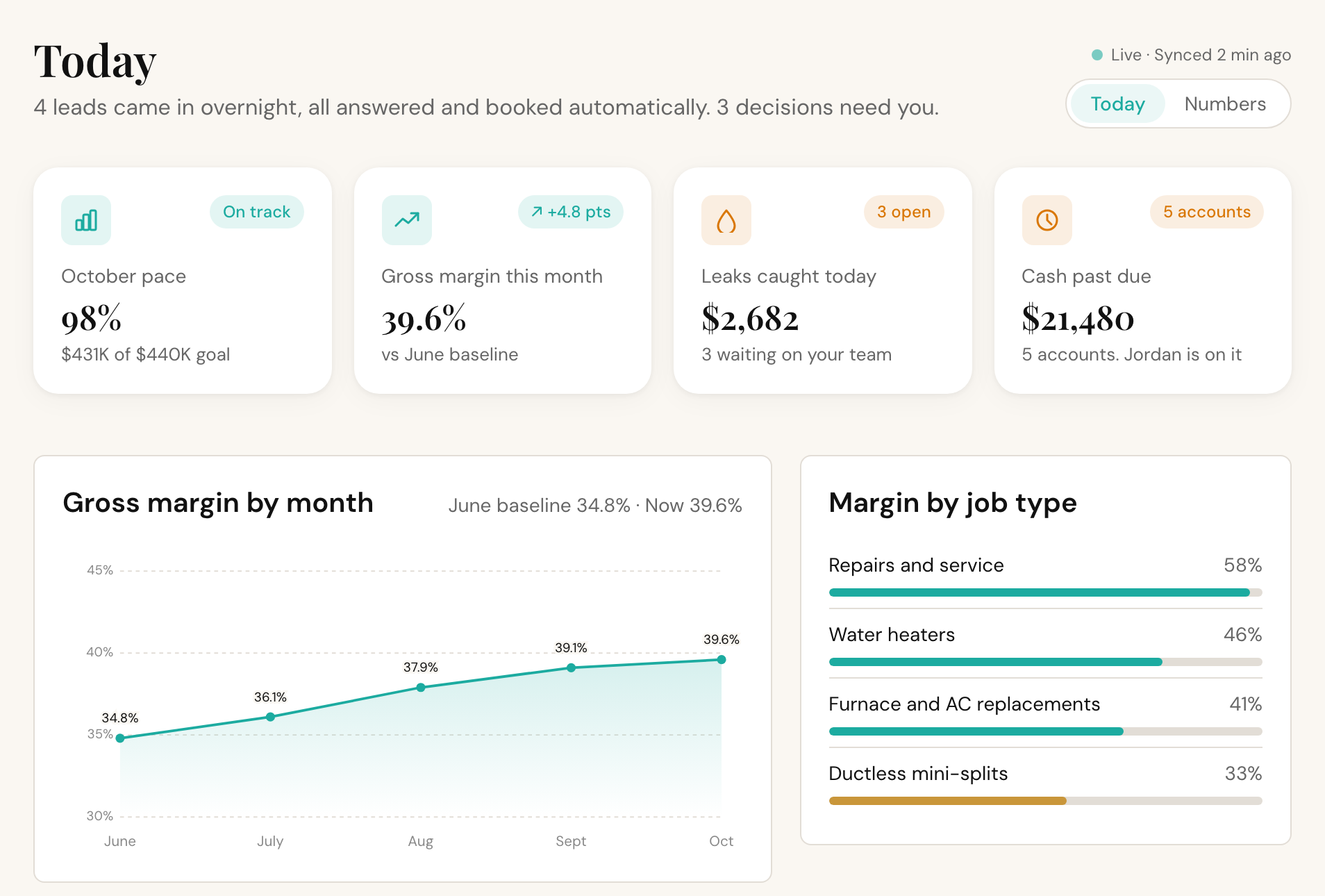
We replace the software you no longer need, and you own the system and your data.
See it in action: test-drive the ProsperityFi Command Center™ yourself at prosperityfi.com/hvac. The company in the demo is fictional, and we never share client data or systems publicly.